
Lead Capture Software: The 9 Best Tools Compared (2026)
Lead capture software falls into four categories that get compared as if they were one. Nine tools with pricing checked in August 2026, sorted by the job each actually does.
 Faheem MushtaqCo-Founder & CTO
Summarize this article with
 ChatGPT
 Claude
 Perplexity
 Grok
GrokLead capture software is any tool that collects a visitor's contact details and passes them to somewhere you can act on them. The category is usually presented as one ranked list, which is why most comparisons are useless: it actually contains four different kinds of product that solve four different problems.
Before comparing tools, work out which of these you need. Nearly every bad purchase in this category is someone buying the wrong type, not the wrong brand.
| Type | Captures leads by | Use when |
|---|---|---|
| Popup tools | Overlaying existing pages | You already have traffic and aren't converting it |
| Form builders | Hosting a form you link to | You need structured data collected |
| Landing page builders | Building a dedicated page | You're sending paid or campaign traffic somewhere |
| Funnel builders | Sequencing questions across steps | You need to qualify, not just collect |
One thing that table hides: the four types don't just capture differently, they feel different to the person filling them in. Most lead capture software still looks like a web form from 1998 — a stack of labelled boxes, asked all at once, on a page that was designed for a desktop monitor and then squeezed onto a phone. A funnel built in CueFully reads like an app instead: one question per screen, answered by tapping rather than typing, on a page that loads in under a second on the device the ad click actually came from. Same offer, same traffic, different number of leads at the end of it.
All pricing checked 17 August 2026.
Key takeaways
- Match the type to your problem first. A popup tool cannot fix a page you don't have; a landing page builder cannot fix traffic that never converts.
- Popups are the cheapest way to lift an existing site — OptinMonster starts at $7/mo on introductory annual pricing.
- Tally is the cheapest genuine form option — unlimited forms and submissions free.
- Unbounce and Leadpages both now include unlimited conversions or traffic, so neither charges you for succeeding.
- ⚠️ Watch the metering. These tools bill on entirely different units — impressions, submissions, visitors, pages — which makes headline prices misleading.
- If you need to qualify leads rather than just collect them, no form or popup tool does that; you need a funnel.
- CueFully is the app-like option in the category — mobile-first funnels that load in under a second, with every lead stored and searchable, sessions and step-by-step drop-off tracked, and an isolated workspace per client. Most of the list still looks like a 1990s form on a phone.
The 9 best lead capture software tools
| Tool | Type | Entry price | Metered on | Best for |
|---|---|---|---|---|
| CueFully | Funnel | See pricing | — | Agencies qualifying leads across clients |
| OptinMonster | Popup | $7/mo* | Impressions | Converting existing site traffic |
| Tally | Form | Free | Nothing | Free unlimited collection |
| Fillout | Form | Free | Responses | Teams needing free volume, no seat fees |
| Typeform | Form | Free / ~$28 | Responses | Brand-facing conversational forms |
| Jotform | Form | Free / $39 | Submissions | Documents and compliance |
| Unbounce | Landing page | $29/mo | Visitors | Paid campaign landing pages |
| Leadpages | Landing page | $5–50/mo | Pages/domains | Affordable pages, unlimited traffic |
| involve.me | Funnel/quiz | Free / $29 | Submissions | Quizzes and calculators |
1. CueFully — best for qualifying leads across multiple clients
CueFully is best for agencies who need to qualify leads, not just collect them, across a roster of clients.
The distinction that matters: a form captures whoever fills it in. A funnel asks progressively, branches on answers, and arrives with a lead you already know something about — the difference between 200 unsorted enquiries and 40 you can act on.
It doesn't look like a form. This is the part a feature table can't convey, so here is a CueFully funnel on a phone, and then a typical form builder on the same phone:

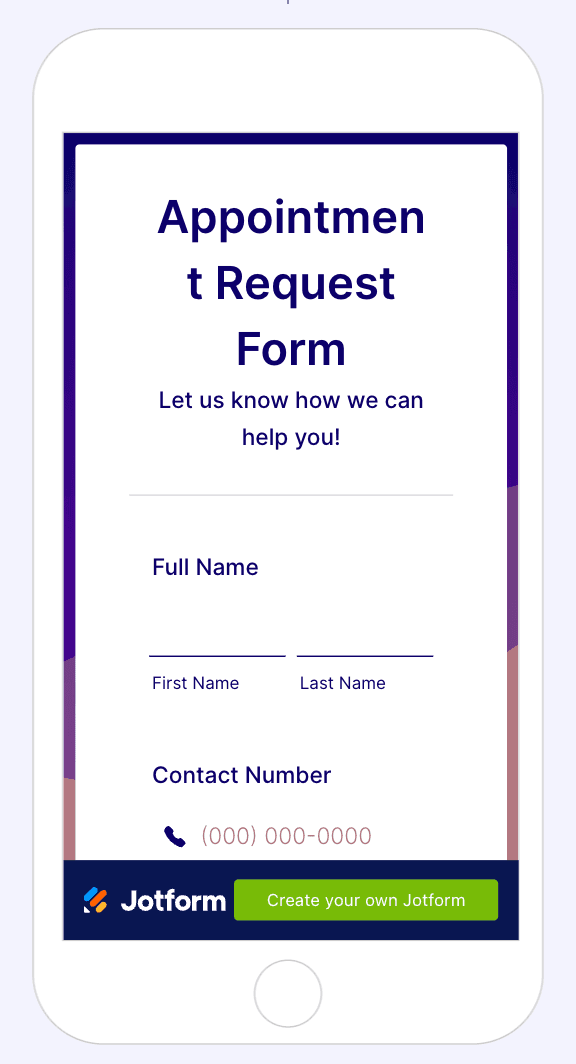
One of those was designed for the screen it's on. The other is a desktop form that survived the trip. Typeform, to be fair, is the one competitor that looks genuinely modern — but it's still a form asking questions in a fixed line, not a funnel that changes what it asks based on the answers.
It's fast, and fast is a mobile problem. Statcounter put mobile at 52.57% of global web traffic in July 2026, and paid social skews far harder than that. Yet forms convert worst on exactly that device: Zuko's benchmarking data shows view-to-completion at 47% on desktop against 42% on mobile. Published CueFully funnels load in under a second on a phone, which is the window where paid traffic is either kept or lost.
What it does well. Mobile-first funnels built for the phone screen where ad clicks land. An isolated workspace per client so leads, funnels and branding never mix. Reusable brand kits, so a client's colours and fonts are set once. No per-lead fees, so the bill doesn't rise when a campaign works.
Capture is only half of it. Most tools on this list hand you a submission and stop. CueFully keeps what happens around it:
- Leads stored and searchable in-product — each one a record with its answers, file uploads and traffic source attached, not a CSV you go and fetch.
- Sessions tracked, not just submissions — including the people who started and didn't finish, which is the group that tells you what's wrong.
- Step-by-step analytics — where each session dropped, which step lost them, what they actually answered, and which source and device they arrived on.
- Delivery into your stack — a Meta pixel with server-side Conversions API so conversions report back to the ad account that paid for them, plus Google Sheets and webhooks.
Scope. CueFully is the capture-and-qualify layer rather than a CRM — it stores and analyses leads rather than running pipeline stages or sending email and SMS, so nurture continues in whatever stack you already use. It also builds funnels rather than overlaying existing pages, so pair it with a popup tool if the job is converting traffic on a site you already run.
Pricing. Listed on the CueFully homepage.
Pick it if you run paid mobile traffic and lead quality — not just lead count — is what you are judged on.
2. OptinMonster — best for converting traffic you already have
OptinMonster is best for sites with existing traffic that isn't converting.
What it does well. The most mature popup and overlay tool in the category — exit-intent detection, page-level targeting, A/B testing, 700+ templates. If people already visit your site and leave without a trace, this is the fastest fix available and it doesn't require rebuilding anything.
Where it falls short. ⚠️ Metered on impressions, which is the harshest unit here — Basic allows 2,500/month, and an impression is a display, not a signup. A modest blog can exhaust that. Also, the advertised prices are a 60% introductory discount and renew at full price: Basic is $84/year introductory versus $210 normally.
Pricing (17 Aug 2026, introductory annual). Basic $7/mo (2,500 impressions, 1 site) · Plus $19/mo (10,000, 2 sites) · Pro $29/mo (25,000, 3 sites, exit intent) · Growth $49/mo (100,000, 5 sites).
Pick it if you have traffic and no capture mechanism. Skip it if you have little traffic — there's nothing to convert.
3. Tally — best free lead capture
Tally is best for anyone who wants unlimited form volume without paying.
What it does well. Unlimited forms and unlimited submissions on the free plan, under fair-use terms. Conditional logic, calculations, payments, file uploads and integrations with Sheets, Notion, Airtable and Zapier are all included free. The editor works like a text document.
Where it falls short. Removing branding, custom domains, partial-submission capture and drop-off analytics need Pro at $24/mo. Thin enterprise controls.
Pricing (17 Aug 2026). Free tier is unlimited; Pro is $24/mo and Business $74/mo.
Pick it if budget is the binding constraint. Skip it if you need branded pages from day one.
4. Fillout — best free volume for a team
Fillout is best for teams who need real free volume without per-seat charges.
What it does well. 1,000 responses/month free with unlimited forms and unlimited users — no seat charges on any tier, which is unusual and matters when several people touch a form. Multi-page forms, conditional logic and PDF generation on the free plan.
Where it falls short. Less visually distinctive than Typeform. Smaller ecosystem than Jotform.
Pricing (17 Aug 2026). Free (1,000/mo) · Starter $15/mo · Pro $40/mo · Business $75/mo (unlimited).
Pick it if several people need access and you don't want to pay for each of them. Skip it if brand presentation is critical.
5. Typeform — best for brand-facing capture
Typeform is best when the capture form is customer-facing and reflects on your brand.
What it does well. The best-designed forms in the category, one question at a time, which lowers the perceived effort of starting.
Where it falls short. The tightest volume limits here — free and Basic (~$28/mo) both cap at 100 responses/month. You need Plus (~$50/mo) for 1,000, which Fillout gives away.
Pricing (17 Aug 2026). Free (100/mo) · Basic ~$28/mo · Plus ~$50/mo (1,000) · Business ~$83–99/mo (10,000).
Pick it if design quality justifies the premium. Skip it if you capture high volume at low tiers — see Typeform vs Jotform for where that flips.
6. Jotform — best for documents and compliance
Jotform is best when captured data feeds a document or compliance workflow.
What it does well. Native PDF generation, HIPAA options on higher tiers, and over 10,000 templates covering narrow administrative use cases.
Where it falls short. Priced per monthly submission, so the bill climbs as you succeed — an awkward model if lead volume is the goal. Bronze is $39/mo for 1,000.
Pricing (17 Aug 2026). Free (100) · Bronze $39/mo (1,000) · Silver $49/mo (2,500) · Gold $129/mo (10,000).
Pick it if your form output is a document. Skip it if volume is growing fast — the alternatives are cheaper.
7. Unbounce — best for paid campaign landing pages
Unbounce is best for teams running paid traffic to dedicated landing pages.
What it does well. A strong page builder with proper A/B testing, and unlimited conversions on every plan — you are never charged for a lead. 100+ templates, free hosting.
Where it falls short. ⚠️ Metered on visitors, and the entry tier is very tight: Starter at $29/mo allows just 500 visitors and 5 pages, which most paid campaigns exhaust in days. Realistically you need Build at $99/mo for 20,000 visitors. Teams leaving over that meter often find the page format is the deeper issue — the eight tools people actually move to are compared here.
Pricing (17 Aug 2026). Starter $29/mo (500 visitors) · Build $99/mo (20k) · Experiment $149/mo (30k, 3 users) · Optimize $249/mo (50k, 5 users) · Concierge and Agency custom. Annual billing saves ~25%.
Pick it if you run meaningful ad spend to dedicated pages. Skip it if your traffic is low — you'd pay for headroom you don't use.
8. Leadpages — best affordable pages with unlimited traffic
Leadpages is best for small businesses that want dedicated landing pages without traffic-based pricing.
What it does well. Unlimited traffic on every tier, with no traffic caps — a meaningfully different model from Unbounce's visitor metering, and better if your volume is unpredictable. The cheaper publishing tiers start at $5/mo.
Where it falls short. Metered on pages and domains instead. Single-page focus rather than multi-step funnels, and less agency-oriented than its price suggests.
Pricing (17 Aug 2026). Publishing tiers: Starter $5/mo (5 pages) · Pro $15/mo (25 pages) · Business $25/mo (50 pages). Full CRO tiers: Grow $50/mo · Optimize $100/mo · Scale $200/mo, all with unlimited pages and traffic. Annual saves 20%.
Pick it if you want predictable costs with variable traffic. Skip it if you need mobile-first multi-step funnels — see our Leadpages alternative breakdown.
9. involve.me — best for quizzes and calculators
involve.me is best for capturing leads through scored quizzes, calculators and assessments.
What it does well. Genuine interactive content — product finders, ROI calculators, personality tests — with scoring logic and personalised outcome pages. People will complete a quiz that tells them something about themselves when they would not complete a form.
Where it falls short. ⚠️ Paid plans limit live funnel count, not just volume: Start ($29/mo) allows 3 live funnels and 1 user, Grow ($69/mo) allows 5, Scale ($139/mo) allows 25. For an agency with fifteen clients that bites before submission limits do. The free tier locks funnels after 50 submissions or 500 visits.
Pricing (17 Aug 2026). The free tier stops at 50 submissions or 500 visits. Paid: Start $29/mo, Grow $69/mo, Scale $139/mo, Enterprise from $499/mo — annual rates, EU VAT excluded.
Pick it if interactive scored content fits your offer. Skip it if you need many live funnels cheaply.
How do you choose lead capture software?
Three questions, in order.
1. Where does the traffic already go? If you have a site getting visitors who leave without converting, a popup tool is the highest-leverage purchase and the cheapest. If you're sending ad traffic and have nowhere good to send it, you need a landing page or funnel builder — a popup has nothing to overlay.
2. Do you need to collect, or to qualify? Collecting means getting contact details. Qualifying means knowing which of those details are worth calling. Form and popup tools collect. Only funnel builders qualify, by branching and staging questions — the mechanics are in our lead generation funnel guide.
3. Have you diagnosed the problem, or guessed at it? Capture software changes what you ask; it does not tell you where people currently leave. A free heatmap tool answers that first, and the conversion rate optimization tools worth pairing with these are mostly diagnostic.
4. What unit are you being metered on? This decides the real cost and is where the headline price misleads. The same "$29/mo" means 500 visitors at Unbounce, 3 live funnels at involve.me, and 25,000 impressions at OptinMonster. Estimate your monthly volume in that tool's unit before comparing prices, then check what happens when you exceed it — some tools upgrade you, others lock your forms until the next month.
A fourth question if you serve clients: does the tool understand that you have more than one? Workspace isolation and reusable branding are the features that decide multi-client work, and most tools in this category have no concept of either. We cover that in the best funnel builders for agencies.
FAQ
What is lead capture software?
Lead capture software collects a visitor's contact details and passes them into a system where you can follow up. It spans four product types — popup tools that overlay existing pages, form builders that host standalone forms, landing page builders that create dedicated pages, and funnel builders that sequence questions across multiple steps to qualify as they capture.
What is the best lead capture software?
There is no single best tool because the four types solve different problems. OptinMonster is best for converting existing site traffic, from $7/month on introductory annual pricing. Tally is the best free option with unlimited forms and submissions. Unbounce is best for paid campaign landing pages. CueFully is best for agencies who need to qualify leads across multiple clients.
Is there free lead capture software?
Yes. Tally offers unlimited forms and unlimited submissions free. Fillout's free plan allows 1,000 responses per month with unlimited users. Typeform and Jotform both have free tiers capped at 100 responses or submissions per month, and involve.me's free tier locks after 50 submissions or 500 visits.
How much does lead capture software cost in 2026?
Entry pricing ranges widely because tools meter on different units. As of 17 August 2026: Tally is free unlimited, Leadpages publishing starts at $5/month, OptinMonster at $7/month introductory, Fillout at $15/month, Typeform around $28/month, Unbounce at $29/month for 500 visitors, and Jotform at $39/month for 1,000 submissions. Realistic working tiers are usually $50–100/month.
What is the difference between lead capture and lead generation?
Lead generation is the whole process of creating demand and attracting potential customers. Lead capture is the specific step where an interested visitor's contact details are collected. Lead capture software handles that one step; it does not create the traffic that arrives at it.
Do I need a popup tool or a landing page builder?
Use a popup tool if you already have traffic arriving at pages that were not built to capture leads — it overlays what exists. Use a landing page builder if you are sending campaign or paid traffic and need a dedicated destination built to convert. If you have neither traffic nor a page, a landing page builder plus traffic is the starting point; a popup has nothing to overlay.
What is the best lead capture software for agencies?
For agencies the deciding features are workspace isolation per client, reusable brand kits, and pricing that does not charge per lead captured. Most tools in this category are built for a single brand and have no concept of a client roster. CueFully is built around that model; Unbounce offers an Agency plan with more domains and users at custom pricing.
Pricing for OptinMonster, Tally, Fillout, Typeform, Jotform, Unbounce, Leadpages and involve.me was checked on 17 August 2026 from each vendor's public pricing page. CueFully pricing was not verified here. Vendors change prices without notice — confirm on the vendor's own site before purchasing. Device traffic share is from Statcounter Global Stats, July 2026. Form completion rates by device are from Zuko's aggregated benchmarking data.
Build from the guide
Start with the Lead Magnet Funnel template
Start from a proven mobile-first flow, customize it for your client, and publish a funnel that captures qualified leads without adding developer work.